


Everyone on your team is teaching their AI the same things. Over and over again.
How the tests work. What the conventions are. What not to touch. Fifty engineers, fifty private setups, the same lessons, every single day.
Nobody notices, because it’s invisible work. There’s no ticket for “explained our mocking pattern to Claude again.” Nobody mentions it in standup. It just quietly eats hours across the whole team while everyone assumes their AI setup is their own business.
But your AI isn’t the problem. The fifty private copies of the same lesson are. And you can fix it without forcing everyone to work the same way.
This article expands on a presentation I gave at Claude Meetup for Builders in Barcelona, you can download the presentation slides here:

One repo, three layers
Every AI coding tool can read instructions straight from your repository.
Claude Code looks for a file called CLAUDE.md.
Cursor has its rules files, Copilot and Codex have their own formats.
These files tell the agent how your project actually works: how to run the tests, which patterns the team follows, which parts of the codebase are load-bearing and shouldn’t be touched casually. Without them, the agent walks in with zero context and guesses. Those guesses are exactly what you keep correcting in chat, session after session.
So the question isn’t whether to give your AI context. You’re already doing that, manually, every day. The question is where that context should live.
My answer is a three-layer structure, that scales form individual contributors all the way to teams with 100+ engineers.
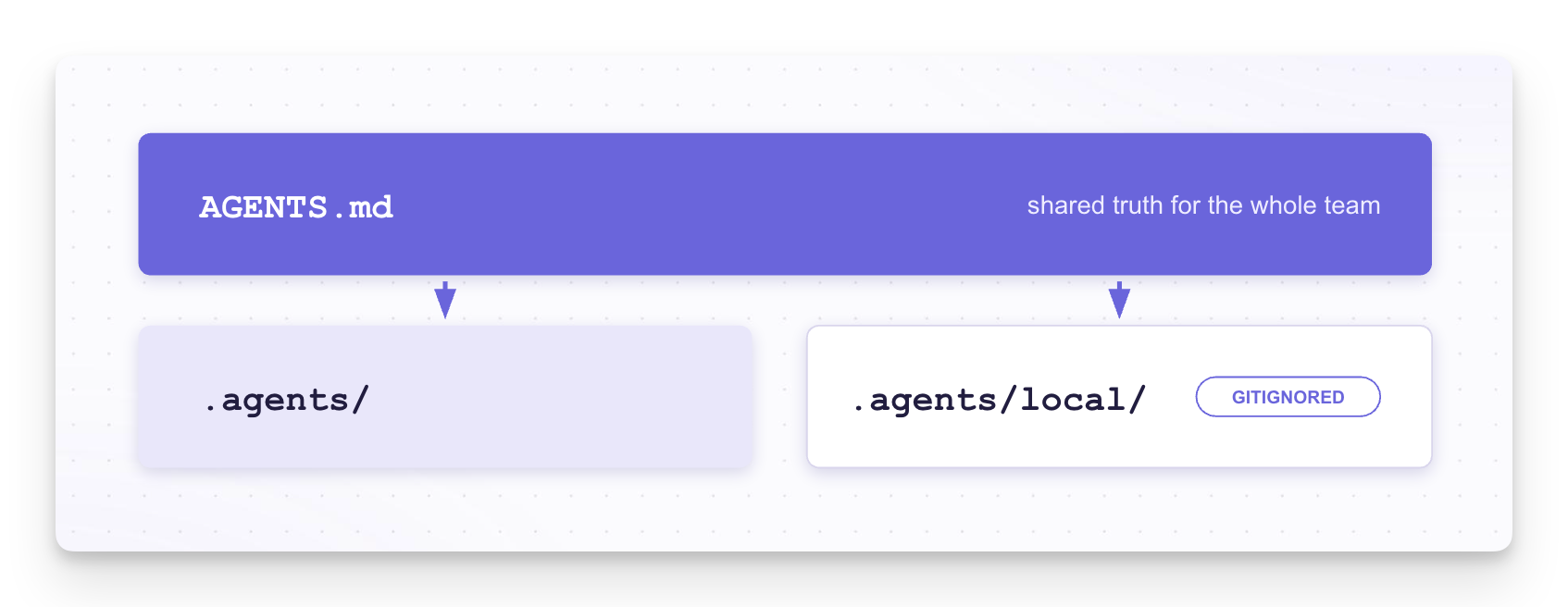
The first layer is a file called AGENTS.md, at the root of the repo.
This is the shared truth for the whole team, and the reason it’s called AGENTS.md and not CLAUDE.md is important: it’s following an open standard, not a vendor file. Cursor, Copilot, and Codex all read it natively.
More than 60,000 open source projects use it, and the standard was donated to the Linux Foundation. So when a teammate says “sounds nice, but I use Cursor,” the answer is: same file. You write the team’s knowledge once, and every tool picks it up.
What belongs in it? Anything that’s true for everyone.
How testing works in this codebase. How experiments are structured. What the code style is beyond what the linter enforces. The stuff you’d tell a new hire in their first week.
This file should be a summary, a constitution, not a wiki. Try to keep it under 60 lines, not 600.
This feels wrong at first, because once you start writing down team knowledge, you want to write down all of it.
But language models don’t follow long rule lists the way a compiler follows code. The more rules you stack into one file, the less reliably the model follows any single one of them.
A short file of principles gets respected. A long file of edge cases gets skimmed.
The second layer is a shared folder of skills, docs, MCPs.
There’s another annoying practical problem here: the tools disagree about where these should live.
Cursor wants a .cursor folder, Codex wants .codex/skills, Claude wants .claude.
That’s fine for a solo developer and painful for a large team, especially if your company lets people choose their own AI tools.
The good news is that a consensus is forming in the agent standards discussions around a vendor-neutral .agents directory, and Codex already recognizes it.

Until the rest catch up, there’s a simple bridge: use your AGENTS.md to point at the folder and explain what’s inside. The agent won’t discover the skills automatically the way it would in its default location, but it will go look for them and use them as expected.
The third layer is your gitignored personal workspace.
These are local instruction files that never get committed. Your shortcuts, your preferences, the workflow quirks that work for you and would start an argument in a team meeting. They are all yours!
Things that I put in my local agent rules:
state & memory (PRDs, notes, issues)
instructions about my personal working style (tone of voice, PR description style)
collaboration rules (aim for smallest working change, don’t run migrations without asking)
personal shortcuts (eg. I use port 5432 instead of 3001)
aliases (“when I say widget, I refer to the daily score card”)
These local instructions can be tested, and if you think they are applicable to the whole repo, you can eventually move them to a permanent place).
Git worktrees do not copy over gitignored files! This might cause some surprises, but you can easily fix it by setting up git hooks for worktree creation and setting up symlinks.
The entire CLAUDE.md
So what happens to CLAUDE.md? How does it look like after all this.
Here it is, complete and unabridged 😁:
@AGENTS.mdThat's the whole file. Yes, just one line.
The @ syntax is Claude's import mechanism: it tells Claude Code to go read AGENTS.md and treat its contents as its own instructions. Cursor, Codex, and Copilot read AGENTS.md natively, and Claude pulls it in through the import.
One source of truth that every tool sees it.
Judgment goes in markdown, law goes in hooks
AI is costly and can hallucinate. Not everything should be done by it.
Everything in AGENTS.md is advisory. In practice the model follows it maybe 80% of the time, weighing your rule against the situation in front of it, a bit like a colleague who knows the guidelines and occasionally deviates.
But hooks are different. They run automatically at fixed points, before or after the agent acts, and they runs 100% of the time.
No judgment, no interpretation, no exceptions.
So the split should be like this:
Judgment goes in instructions, where the model can weigh it.
Law goes in hooks, where it’s enforced without discussion.
Formatting, linting, blocking secrets from being committed: those are laws, put them in hooks.
“Prefer this pattern, here’s why”: that’s judgment, put it in markdown.
Deciding what’s judgment and what’s law is a negotiation between humans.
Negotiate the shared stuff together. Testing standards, code style, what counts as done.
And leave room for individuals.
Context is a team sport. Shared project context, plus individual workspace