

It’s 4 pm. I have 10 parallel conversations open, three PRs waiting for review, and I can’t remember which localhost port belongs to which worktree.
AI anxiety is real.
Because, sure, it can do things so much faster than we can. But instead of simply saving us time, it ended up increasing expectations.
AI promised us more freedom and fun, but brought more stress and—for many—burnout.
More agents, less control. And definitely less “flow” state.
But it doesn’t have to be like that.
As with most things, a little planning and a flexible mindset can change everything!
Our job has changed in the last three years, and we’re never going back to manually typing out every line of code. So it’s time to change how we work.
Coming Up With New Systems
I love systems.
Railway networks, forest ecosystems, airport conveyor belts that know where to take my suitcase even if I cross the world. Heck, my current favorite computer game is Factorio, where you literally build space-age production lines. Beautiful.
Good systems need little effort to run. And they are deterministic: the same input gives you the same output. If you’re a software engineer, you know exactly what I mean.
AI is not like that. Even with the same simple prompt, the output varies each time. On larger tasks, it’s worse: an unknown amount of time, an unknown number of iterations, and an unpredictable result.
We can’t change that. It’s not in AI’s nature.
But we can (and should) build systems that withstand these uncertainties and make the workflow somewhat deterministic.
Before the Work
One of the best ways to reduce AI anxiety is to eliminate the constant back-and-forth with the agent. Less human-in-the-loop, more human-away-from-babysitting.
And the best way to do that is to batch most human input at the very beginning of the job.
You start typing out what you want to achieve. Implement a new feature. Fix a bug. But of course, you get the best results if you give the most relevant context.
I usually start a task by getting to a shared understanding of the overall task: explain my goal, link to tickets, attach PRDs, tech specs. Point to other relevant repos, if there are any. Point out key considerations and any existing examples, if I can find them.
Then I ask chat to understand everything, review the codebase and docs, and return a few-sentence summary of what’s expected.
I’ve found that this little pause can already ensure it gets the main idea and direction right, and that even if minor issues come up later, the core concepts are nailed down.
Then I let AI ask me back to clarify the unknowns. Because my explanation is vague, I might’ve forgotten certain edge cases, or new changes might impact unexpected parts of the system. The agent’s pretty good at catching them, but it needs to know how to deal with them. And since I’m the captain steering the boat, I need to decide.
I use Matt Pocock’s /grill-me-with-docs skill, which gives me a set of questions, one by one, with explanations, and even options I can choose from. Remember, I’m talking to an AI, so if anything is unclear, I can just ask back for more details.
Going through this interview helps put all details in place and will save me a lot of back-and-forth during execution and testing.
Once the agent runs out of questions, it creates a spec. It includes all our findings, relevant info for the subagents that will do the implementation, and breaks the project into chunked tasks (issues).
Set the Goal
At this point, you did what’s humanly possible. Now it’s time for your agent to get to work.
You don’t want to be bothered by this task until it’s your turn to review the final version, so let your harness know: in most tools, you can set a goal to keep AI working across turns toward a verifiable stopping condition.
It might be as simple as the /goal command, followed by a prompt like this:
I want you to implement what we just discussed, following the spec. You can use subagents to keep each task’s context small.Once you feel confident with the results, create a pull request and fill it with details and instructions.
You are only done when all CI steps pass in the pull request.
Here, the definition of done matters most: it will not bother you again until it’s really done done.
You can step aside while your agent swarms subagents to work through the issues. Sometimes even in parallel, if possible.
This part is pretty straightforward and will do a decent job.
But you want better than decent. You want your agent to do its very best, how you would do it, so you don’t have to bother with it later.
And that’s where custom skills come in.
Remember, AI is nondeterministic by default. But you can set rules in your skills to make it behave more to your liking.
For example, ChatGPT Codex would, for some reason, often start git branch names with codex/. But that’s super easy to control: just create a skill for branch and commit naming conventions.
Or if you’re working on a mobile app and need to bump the version number with every deploy: just write the instructions in a skill, and it will follow your rules.
If you have specific testing patterns, need to move JIRA tickets, fill out PR descriptions, run custom bash commands - they all belong in skills.
You configure them once, and AI will apply them from now on, saving you tremendous time and back-and-forth later.
You can even have a specific skill for babysitting the CI, so it checks periodically for failures and jumps in to fix them. Cursor has this built in as /babysit, and there are Claude Code versions of it too.
These skills will ensure your agent not only works toward your goal, but does so in ways that align with your preferences.
Don’t Get Lost
So far, we’ve looked at how to handle a single task.
But why not burn those tokens and tackle multiple issues at once?
Of course, you can run multiple sessions, use Git worktrees to separate workstreams, and avoid agent collisions. Claude Code, Codex, and Cursor do that for you already automatically.
And this is where anxiety can creep in: because the more you parallelize, the more overwhelmed you get, jumping from one chat to another.
I don’t say I have the perfect solution, but a few things help me feel in control.
The most important thing is to eliminate interruptions while your agent is running. When you kick off work (after the specs and issues are created), tell the agent not to bother you during development. You can always come back and make adjustments at the end; it’s easier than stopping for every small step.
For this, you gotta keep your computer alive. I use Amphetamine (what a funny name), a menubar app that keeps my Mac awake for a predetermined time.
I also rename every session, so I don’t have to spend brainpower finding the relevant ones.
I’m a visual person, and you probably are too. And skimming through a bunch of text is not so fast.
But you know what’s fast? Spotting a 🎃 emoji.
I start important chats with emojis so I can spot them immediately. Use different ones for different tasks to remove the stress of finding old conversations.
Then, sound notifications. Not to bother you with more notifications (in fact, I recommend you turn off all the others), but because your agents’ work time is undetermined, and you don’t want to keep re-checking whether they are done.
It’s much easier to focus on other tasks and come back when you hear a ping.
When you use multiple worktrees, it can get confusing to know where to look for changes.
So I have a skill called ready-for-review that makes sure the agent prints some relevant information when it hands me the final job:
a link to a running dev server where I can test the work (often with a custom port, since there are probably multiple dev servers on the multiple worktrees)
an absolute link for the worktree’s folder in my file system
a link to the Jira/Linear ticket, and ticket ID
a link to the open PR
2–3 steps to test the change
The agent decides when to show it. If it only answered a question, there’s nothing to review, so it skips it.
These help me to test things right away, and I don’t have to scroll up or ask them explicitly.
You can install it from my skills repo:
npx skills@latest add johnnyfekete/skills --skill ready-for-review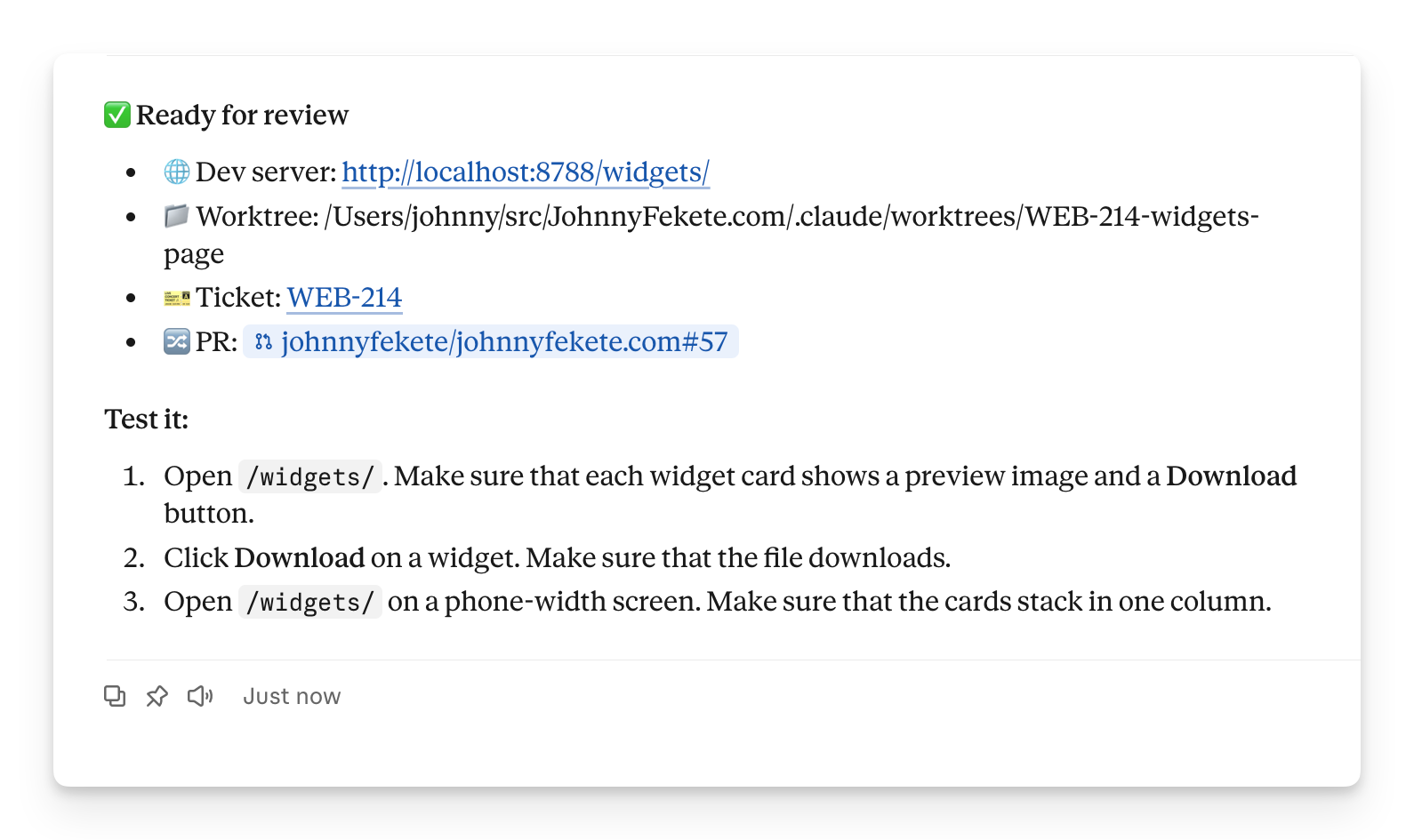
The previous actionable tips might help you to not get overwhelmed while your agents are writing the code. But your work doesn’t stop there. You must understand the changes and ensure you deliver high-quality work before you press “Merge”.
The Path to Production
Software engineers’ jobs have shifted from writing code to understanding AI-generated code.
AI can write high-quality code, but we still need to check whether it fits the overall architecture, whether it missed anything or ignored edge cases, and whether it deviates from existing coding patterns.
But AI-generated changes are often large and touch many files.
And no one likes reading through a PR with such overwhelming changes.
I use a custom explanation skill that works on your PR and others’, helping you break down the changes: it first explains the overall change in easy-to-understand language, sometimes even adding charts to help you envision the implementation. Then it breaks it down step by step, pulling in code examples from the PR to make sure everything is covered. It looks at the tests and tells me the stories behind them. It provides links to click through the changes in real life and explains the steps and expected outcomes.
The understanding part is super interactive, the opposite of what I wanted while the agent was writing the code.
During execution, I didn’t want interruptions.
But now I want a solid understanding.
If you want to try something similar, there are already good ones out there. pr-buddy asks you questions about the PR before it gives its own answers, so you have to think. And Warp’s pr-walkthrough draws interactive diagrams of the changes.
Call me old-fashioned, but at this point I like looking at the code in its place. So I still use VS Code to explore how things are set up. Not just the “git diff” view of GitHub, but the latest state of the whole codebase. I find it useful because I can click imports, follow links, open multiple files, and quickly understand changes not only in isolation, but in the context of the whole codebase.
But I’m not the only one who reviews my (my AI’s 😅) changes. I use a swarm of reviewer agents to inspect the changes from various angles. A bunch of products can help: CodeRabbit, Greptile, Aikido, or GitHub’s very own Copilot. These are paid services, but there are open-source alternatives that use your own tokens, either in CI or running locally from your harness. They can look for common patterns, security issues, and accessibility gaps, or whatever’s relevant to your changes.
These automated reviewer agents can catch issues you didn’t consider and are often unbiased, since they don’t use the same context as the implementation did.
I’ve talked to engineers who use a totally different model behind the scenes to diversify further and catch more potential issues.
When I review code changes, I might spot obvious issues, and I don’t want AI to repeat them. That can range from overly verbose, repetitive tests to unnecessarily bloated multi-line comments or creating new methods when similar ones already existed.
Whenever I spot them, I add them to my custom review rule list and have the automated reviewer check them too. As this list keeps expanding, I can make sure that each time I look at the code, there are fewer and fewer problems that AI could’ve avoided during implementation.
Automatic workflows
If you look at your Claude Code / Cursor, you might see the “Scheduled” item on the sidebar. But have you ever used it?
I haven’t really until recently, when my friend showed me how he uses it to make sure a PR reaches a mergeable state.
You can set up recurring automations to check your open PRs periodically. These jobs are created like regular AI threads, and you can instruct them to look for failed CI steps (and resolve them automatically). Fix merge conflicts if they appear. Or even to answer (and fix) easily resolvable comments that the reviewers leave.
I find it super powerful because a big chunk of the back-and-forth is making sure that your changes get into a state where you can confidently merge them to production.
But even with all the automations, you should still be the one pushing the Merge button!
What Stays?
So if AI does all the work, what’s left for you?
I think the first half of this question is incorrect. AI doesn’t do all the work. It does the parts that machines can do. But you’re still needed to give directions, provide instructions, and keep the big picture in mind. You figure out what your agent should do and how it should work.
I had a full article on how to be a good engineer when AI writes all your code, and the conclusion is that manually writing code was not the most important part of your job anyways.
Using agents should simplify your work, not bring chaos and anxiety.
These examples follow my personal workflows. And they are constantly evolving.
My final advice: don’t follow it word for word, but try to build your own system.
Be mindful of it.
Set it up once, and keep optimizing it.
Don’t stop looking for new skills and discovering new techniques that can help you.
And share your workflows with fellow engineers.
I’m starting with mine: I put my skills in a public repo, and I’ll add more as I build them. Take what you like, change it, and tell me what you’d do differently.
Because learning from each other is fun!